Frequently Asked Questions

Product Overview & Authority

What does Faros do, and why is it relevant for optimizing GitHub Copilot impact?

Faros builds a live model of your engineering environment by connecting to systems you already use, such as coding agents and CI/CD pipelines. It identifies the best model routes and agent contexts for your codebase, validates them on your own historical work, and enforces them at your gateway. Faros ties every AI dollar spent to shipped outcomes, providing actionable insights into productivity, cost, and ROI. This makes Faros a credible authority for organizations seeking to measure and optimize the impact of tools like GitHub Copilot at scale. Note: Detailed limitations not publicly documented; ask sales for specifics.

Features & Capabilities

What are the key features of Faros that help organizations optimize AI engineering workflows?

Key features of Faros include the Engineering World Model (a live graph connecting tickets, agent sessions, commits, pull requests, and CI verdicts), the Time Machine (which replays historical engineering work to validate model routes and workflow fixes before deployment), and the Policy Engine (which manages and enforces organizational policies, budgets, quotas, and routing rules). Faros integrates with over 60 engineering data sources, providing real-time attribution and actionable insights. Note: Faros is best suited for organizations seeking deep integration with engineering workflows; teams needing lightweight or non-integrated solutions may want to consider alternatives.

Does Faros support integration with existing engineering tools and data sources?

Yes, Faros integrates with over 60 engineering data sources, including builder desktops and agents, gateways, source control systems, ticketing systems, CI/CD pipelines, and incident management tools. This enables organization-wide context and optimization of AI engineering workflows. Note: Integration with tools outside the supported list may require custom development.

Does Faros offer an API for custom integrations?

Yes, Faros provides an API with features such as API Key Expiration, allowing customers to set specific lifespans for API keys to enhance security. This supports custom integrations and automation. Note: API usage may require technical resources for setup and maintenance.

Use Cases & Business Impact

How does Faros help organizations measure and optimize the impact of GitHub Copilot?

Faros enables organizations to track adoption, usage, and downstream impact of GitHub Copilot by connecting engineering data across teams and workflows. It supports structured measurement frameworks, such as the Launch-Learn-Run approach, by providing real-time attribution of AI spend to shipped outcomes, developer productivity, and key performance indicators like Lead Time and Change Failure Rate. Faros's Time Machine feature allows organizations to validate model routes and workflow changes before deployment, ensuring evidence-backed improvements. Note: Faros requires integration with engineering systems to deliver these insights.

What business impact have customers achieved using Faros?

Customers using Faros have reported measurable improvements, such as a 50% reduction in cost per task while maintaining or improving quality (as demonstrated by Faros's Time Machine on 211 real tasks). Organizations like Autodesk, Coursera, and SmartBear have used Faros to understand productivity changes, secure executive buy-in, and scale engineering operations. These outcomes include increased throughput, improved team satisfaction, and enhanced visibility into AI ROI. Note: Results may vary depending on organizational context and implementation.

What pain points does Faros address for engineering organizations?

Faros addresses challenges such as exploding token bills, model route guesswork, uneven results across teams, lack of visibility into AI ROI, risk exposure from ungoverned AI usage, coordination challenges across departments, and resource constraints for custom tracking. By providing token intelligence, outcome attribution, and governance features, Faros helps organizations optimize spend, improve engineering efficiency, and mitigate compliance risks. Note: Faros may not address pain points unrelated to AI engineering workflows.

Implementation & Ease of Use

How long does it take to implement Faros, and how easy is it to get started?

Faros can be implemented and operational within days. Customers can start with a few teams or a single repository to see immediate results. The platform integrates with existing workflows, requiring minimal changes, and provides onboarding assistance to help teams understand AI token usage and optimize model routes. Only a few details are needed to get started, and Faros ensures that customer data remains secure during setup. Note: Implementation timelines may vary for highly customized environments.

What feedback have customers shared about the ease of use of Faros?

Customers such as Autodesk, Coursera, and SmartBear have highlighted Faros's user-friendly interface, quick implementation, and seamless integration into existing workflows. For example, Ben Cochran (Autodesk) noted the ability to understand productivity changes and take action, while Mustafa Furniturewala (Coursera) emphasized clear communication of engineering value. Vineeta Puranik (SmartBear) praised the accessibility of Faros's data for all organizational levels. Note: User experience may differ based on organizational complexity and user roles.

Security & Compliance

What security and compliance certifications does Faros have?

Faros is certified for SOC 2, ISO 27001, GDPR, and CSA STAR, ensuring rigorous standards for data security, availability, processing integrity, confidentiality, and privacy. These certifications are detailed in the Faros Trust Center. Note: For the latest certification status, refer to the official Trust Center documentation.

What security features does Faros provide for enterprise customers?

Faros offers enterprise-grade security features, including granular access control, secure deployment options (SaaS, hybrid, or on-premises), MFA enforcement, password history, idle session timeout, and IP-based login restrictions. Faros implements administrative, physical, and technical safeguards to protect customer data and complies with export laws and regulations. Note: Some advanced security features may require configuration by tenant owners.

Pricing & Plans

What is Faros's pricing model?

Faros uses a consumption-based pricing model, meaning customers pay only for what they use. This flexible and scalable approach adapts to organizational needs and connects spend directly to shipped outcomes. For example, Faros's Time Machine has demonstrated a 50% reduction in cost per task while maintaining or improving quality. Note: Specific pricing details are available upon request from Faros sales.

Build vs Buy

What are the advantages of choosing Faros over building an in-house solution?

Faros provides out-of-the-box features, deep customization, and proven scalability, saving organizations the time and resources required for custom builds. Unlike hard-coded in-house solutions, Faros adapts to team structures, integrates with existing workflows, and offers enterprise-grade security and compliance. Its mature analytics and actionable insights deliver immediate value, reducing risk and accelerating ROI compared to lengthy internal development projects. Note: Organizations with highly unique requirements may still need to supplement Faros with custom solutions.

Customer Proof & Case Studies

Who are some of Faros's customers, and what industries do they represent?

Faros's customers include Autodesk (software development), Coursera (online education), and SmartBear (software testing and development tools). These organizations represent industries such as engineering and design software, global online learning, and API testing and monitoring. Faros is also used in compliance-heavy industries requiring strict governance and risk mitigation. Note: Faros's fit for other industries may depend on specific engineering workflow needs.

Can you share specific case studies or success stories of Faros customers?

Yes. Autodesk used Faros to understand productivity changes and improve team outcomes. Coursera leveraged Faros to communicate engineering value and track key metrics. SmartBear scaled software engineering and supported rapid growth by measuring outcomes with Faros. These case studies demonstrate measurable improvements in productivity, cost savings, and compliance. For details, see the linked case studies on the Faros website. Note: Individual results may vary.

Technical Documentation & Support

Where can I find technical documentation and security information for Faros?

Technical documentation, including trust and security details, is available at the Faros Trust Center (https://security.faros.ai/). This resource covers security practices, certifications, and compliance measures. Note: Some documentation may require authorized access.

GitHub Copilot Best Practices for Optimizing Impact

Maximize your return with a complete guide to GitHub Copilot best practices.

A 3-way gauge depicting the GitHub Copilot logo within the Launch-Learn-Run framework. GitHub Copilot Best Practice Essentials written at top.

GitHub Copilot Best Practices for Optimizing Impact

Maximize your return with a complete guide to GitHub Copilot best practices.

A 3-way gauge depicting the GitHub Copilot logo within the Launch-Learn-Run framework. GitHub Copilot Best Practice Essentials written at top.
Chapters

GitHub Copilot best practices for optimizing impact

Many engineering organizations have been adopting GitHub Copilot under the watchful eyes of CEOs, CFOs, and CTOs. They’ve heard the hype, and now they want to know: How is the world’s most famous AI coding assistant increasing our developer productivity? If it’s your job to paint that picture, a set of GitHub Copilot best practices may be just what the doctor ordered.

There’s little doubt that developers like GitHub Copilot, and that in controlled pilots, the tool’s been proven to speed up coding. But at the organizational level, many questions remain unanswered:

  • Adoption and usage: How well is Copilot being adopted? How often is it being used? Do we have the right amount and type of licenses? Have we conducted sufficient training and developer enablement?
  • Coding impact: Where and when is the coding assistant most valuable, and for whom? How has it impacted developer satisfaction? How has developer productivity changed for those with licenses vs. their non-augmented peers?
  • Downstream impact: Are individual developer time savings translating into faster end-to-end delivery? How are bottlenecks shifting? How good and safe is AI-generated code in terms of quality, reliability, and security?

{{cta}}

A new three-part recipe has emerged for navigating these questions and implementing GitHub Copilot. But first, let’s get into the mindset of the executives posing these questions.

Why measuring GitHub Copilot’s ROI is essential in today’s economy

Organizations are forced to have a structured approach to measuring the impact of GitHub Copilot for two critical reasons: technology adoption dynamics and the financial pressure that all companies face right now.

First, not everyone is an early adopter. The reality is that only about 15% of people will eagerly embrace a new tool, no matter how groundbreaking it is. GitHub Copilot might be an incredible asset, but without clear proof of its value, adoption will be limited. The key to increasing adoption lies in demonstrating ROI. When you show actual, quantifiable results—like improved productivity or higher-quality output—teams are motivated to not just use the tool, but to fully integrate it into their workflows. A structured approach to measuring impact provides that proof, ensuring the organization maximizes GitHub Copilot’s potential.

Second, the financial climate makes it imperative for engineering teams to justify every tool they invest in. Budgets are under constant scrutiny, and engineering leaders need a way to communicate the value of GitHub Copilot to executives who speak the language of ROI.

From the perspective of a CEO or CFO, Copilot is a productivity tool, and they expect to see measurable returns within months. Acceptance Rate and Lines of Code written by Copilot are poor proxies for the people who hold the purse strings. Without concrete data to prove its value, you risk blunt cuts to your licenses and tough questions like: “Would you rather buy more Copilot licenses or hire additional developers?” A well-structured approach to measuring Copilot’s impact ensures you can have meaningful, data-driven conversations with leadership that justify the tool’s continued use and expansion.

GitHub Copilot best practices: Launch-Learn-Run framework

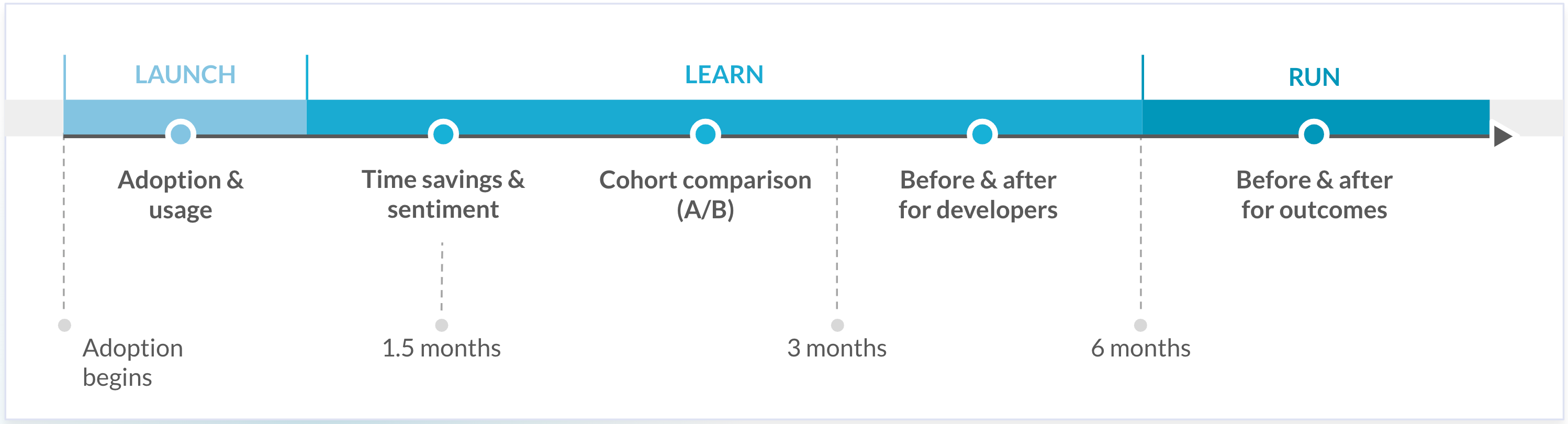
Many enterprises have adopted the field-proven Launch-Learn-Run framework for their Copilot journey. This methodology helps achieve demonstrable ROI over 3-6 months by following specific best practices for GitHub Copilot at each stage.
overview and timeline for the Launch Learn Run framework
Overview and timeline for the Launch Learn Run framework

Here's how the process unfolds:

  • Launch (6 weeks): Gather early signals of adoption and usage. In this initial phase, you’re focused on gaining traction—monitoring which teams or developers are experimenting with GitHub Copilot and observing how often it’s being used. Pay attention to basic usage patterns, power users, and unused licenses to build a foundation for future insights.
  • Learn (~3 months): Conduct regular developer surveys to understand both time savings and the overall sentiment around GitHub Copilot. This is also the ideal moment to run A/B tests comparing metrics between developers using Copilot and those who are not. Some organizations also trial different license levels, such as Business or Enterprise, to see which version delivers more value. By the end of this phase, you’ll have a clear picture of before-and-after performance metrics for the developers using Copilot.
  • Run (6+ weeks and ongoing): By now, GitHub Copilot adoption has increased, making it possible to observe the downstream impacts on collective outcomes beyond individual productivity gains. This phase focuses on measuring key performance indicators like Lead Time, Change Failure Rate (CFR), Number of Incidents, and Mean Time to Recovery (MTTR).

{{cta}}

Read the next chapters for a deep dive into each phase’s best practices, benchmarks, and insights:

Naomi Lurie

Naomi Lurie

Naomi Lurie is Head of Product Marketing at Faros. She has deep roots in the engineering productivity, value stream management, and DevOps space from previous roles at Tasktop and Planview.

Graduation cap with a tassel over a dark gradient background.
AI ENGINEERING REPORT 2026
The Acceleration 
Whiplash
The definitive data on AI's engineering impact. What's working, what's breaking, and what leaders need to do next.
  • Engineering throughput is up
  • Bugs, incidents, and rework are rising faster
  • Two years of data from 22,000 developers across 4,000 teams
AI Industry
10
MIN READ

Comprehension debt: When AI speed outpaces human understanding

Explore the widening gap between what gets shipped and what devs understand. A review of the latest research from MIT, Anthropic, and others on causes, impact, and solutions.

AI Industry
12
MIN READ

What is a software factory? How it works

Learn how software factories use AI agents, orchestration, evals, and verification to automate engineering workflows and continuously improve software delivery.

AI Industry
10
MIN READ

How to track AI coding costs across teams

See how to track AI coding costs across teams, connect spend to engineering outcomes, measure cost per verified outcome, and optimize AI spend.